Now live on the App Store

Turn your messages into shared to-dos.

Wisped turns your Apple Messages conversations into a shared to-do list, without ever leaving the chat. Send a “Wisp” mid-conversation and it lands on a list you both see.

Apple-native • private by design No account setup • send a link to your partner and the app is ready Syncs to a shared list
Available now
Get Wisped for you and your partner — free to download
Or find us @WispedApp on X and Instagram.
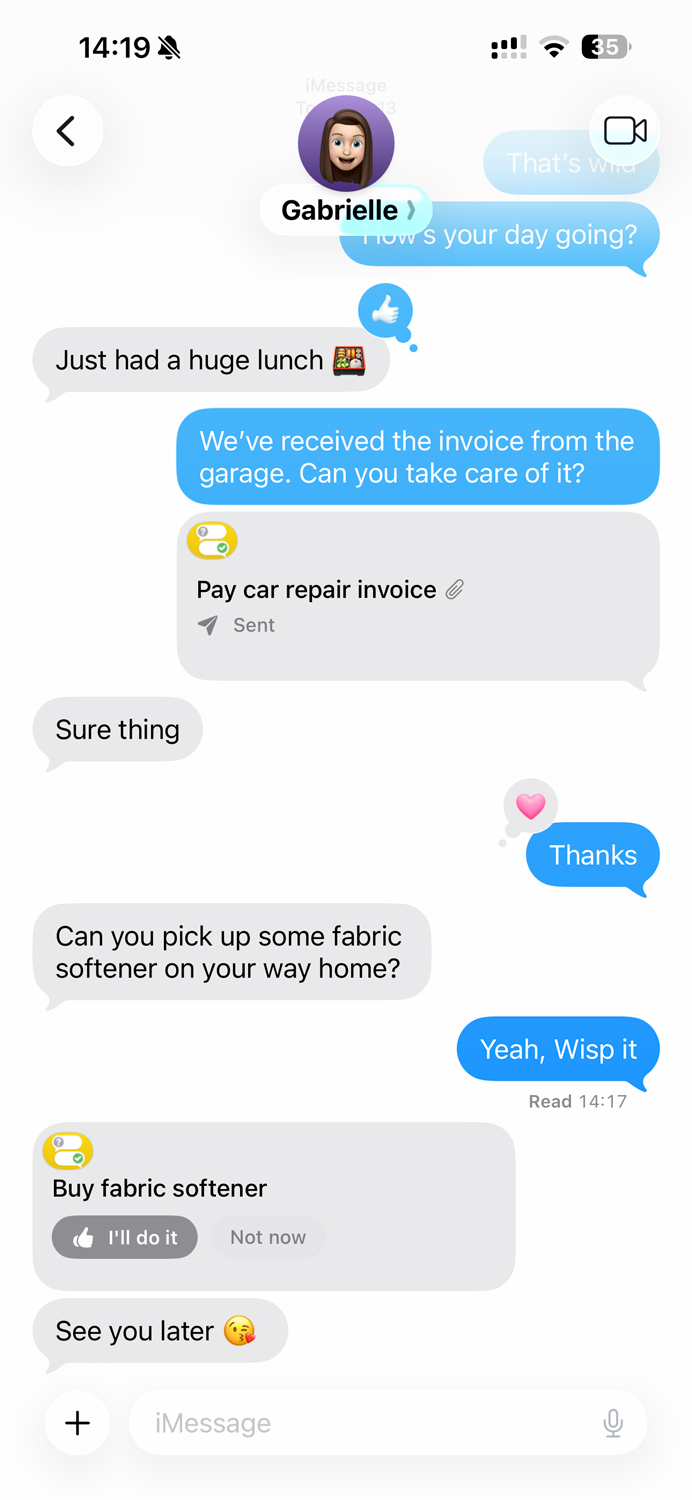
Wisped shared to-do list on iPhone Creating a Wisp inside an Apple Messages conversation

How Wisped works

Wisped works where you already communicate. A task created in your chat feels like part of the conversation — because it is. No new habits to build, no app to convince your partner to open.

1 Send a Wisp

Open Wisped in any conversation

Type a task and send it as an interactive message, without leaving Apple Messages.

2 Your partner replies

Accept or decline, right in the chat

The bubble updates live, so you both know where the task stands without asking.

3 Track it together

Everything in a shared dashboard

Active, done, all — you both see the same list in the Wisped app.

Why Wisped

Most shared to-do apps make you leave the conversation, open a separate app, type the task again, assign it, and hope your partner checks. That’s too many steps — most couples give up after a week.

Live message bubbles
Tasks update in real time as they’re accepted or completed.
One shared dashboard
Every task in one place, organised and clear, for both of you.
Partner linking in one tap
Connect with a simple invite link. No accounts to create.
Photo attachments
Attach a picture to show exactly what you mean.
Designed for two

One shared list, two partners

Groceries, household repairs, errands, or that thing you keep forgetting — it’s all in one place.

🚗 “Can you sort out the invoice we received?” → Shared task
🍸 “Can you make sure we have an apéro for our guests?” → Shared task
🔧 “Please fix the closet door” → Shared task
🦷 “Can you book a dentist appointment for the children?” → Shared task
Download on the App Store Privacy

FAQ

Short answers to common questions

Do we both need iPhones?

Yes. Wisped is built for Apple Messages and can only be used when both partners use iPhone + Messages.

Is this like Reminders?

Not really. Reminders is a list. Wisped is a workflow: you create tasks from the conversation, so it’s effortless and shared by default.

Does Wisped work if we already chat in WhatsApp?

Wisped is designed specifically for Apple Messages. If Messages isn’t where your coordination happens, it won’t feel as natural.

Is there an account or login?

No account creation. Once a link is shared and accepted via Messages or Airdrop, the app automatically links both partners through their Apple Accounts.

Can I still add tasks in the main app?

The core idea is that tasks originate in conversation. The main app is where you review, view attachments, set reminders when needed, complete, and keep the shared list tidy.

How much does Wisped cost?

Wisped is free to download from the App Store and starts with a free trial. After that it continues as a subscription, billed through your Apple Account. You can cancel any time in iOS Settings.

What do we need to run it?

An iPhone running iOS 26.2 or later, for both partners, with iCloud turned on. Wisps are created in Apple Messages, so both of you need Messages as well.

Your data stays private

Your data syncs through iCloud and stays on your devices. Just you and your partner.

iCloud sync

Stored in your iCloud

Wisped syncs through your own iCloud account, using Apple’s CloudKit.

No servers

No third-party servers

There’s nothing in the middle. No accounts to create, no data harvesting.

Transparent

Clear policy

The limited information we use and store is set out in our privacy policy.

Read our privacy policy